Twenty successful training steps are encouraging. The model ran, the loss was finite, and the GPU did not run out of memory. It is tempting to call that a successful hardware test.
But imagine starting a much longer run with exactly the same configuration. The first checkpoint takes longer than expected. Validation creates a memory peak that the short test never reached. Or the chosen precision works for most layers, only to encounter a kernel that cannot execute on this GPU. None of these problems contradicts the first twenty steps. They simply ask questions that the short test never answered.
This is the difference between getting training to run and qualifying a GPU for training. Qualification is not a property of a graphics card in isolation. It is a decision about one hardware, software, model, data, and training-recipe combination, backed by observations from that combination.
What would convince us to commit a long run to it? We need to know that the actual computation is compatible, that its speed is meaningful, that memory has room for the less ordinary moments, and that an interruption is recoverable. Let’s follow those questions in the order a cautious training run would encounter them.
First, does the real computation work here?
A GPU being available is the beginning of the story, not the end. Different devices support different numerical formats and kernels. Even two machines running the same Python training command may not take the same computational path.
The project records the GPU name, total device memory, compute capability, PyTorch and CUDA versions, and execution settings in each session recorded in the run.json manifest. That makes a result traceable to an environment. It does not, by itself, prove that the environment can run the workload.
Consider BF16. It uses fewer bits than FP32 but keeps FP32’s exponent range, which makes it attractive for training. That doesn’t mean every GPU supports it natively. The trainer checks for native BF16 support before running the mixed-precision path:
if precision == "bf16" and device.type == "cuda":
    with torch.cuda.device(device):
        if not torch.cuda.is_bf16_supported(including_emulation=False):
            raise ValueError("This CUDA device lacks native BF16; choose fp32 or fp16")
This is an excerpt from validate_precision. It prevents one obvious mismatch. It does not certify that every attention, MoE, backward, and optimizer kernel works with the selected precision on the target device. That requires running the actual model and training recipe, not just detecting CUDA or successfully training a tiny substitute.
FP16 asks a different question. Its smaller exponent range makes gradient overflow a practical concern. The loop uses GradScaler for FP16. If the scale falls after an attempted optimizer step, the update is counted as skipped. The tokens have still been consumed, but the successful-step counter and learning-rate progression do not advance. After repeated consecutive skips, the trainer raises an error rather than silently continuing forever. These behaviors are implemented in the training update loop.
There is a useful warning hidden in the tests. One CUDA FP16 test deliberately replaces an MoE path because the grouped_mm operation used there requires BF16. It then tests the scaler’s overflow behavior in isolation. That is valuable coverage, but it is not evidence that the complete Kimi K3 path runs in FP16. The distinction is explicit in the test itself.
So the first qualification question is not simply, “Does the device support BF16?” It is, “Does our intended precision execute the full forward, backward, and optimizer update on this device, without unacceptable numerical failures?” A passing capability check tells us where to start. A representative training run must supply the rest of the answer.
A fast step can hide a slow run
Once computation is compatible, performance seems straightforward. Count the tokens processed and divide by time. But which time?
Imagine two clocks running beside the training job. The first advances only while batches are being fetched, passed through the model, differentiated, and used for updates. The second keeps running during validation, checkpoint saving, reporting, and profiling too. Both clocks tell the truth. They answer different questions.
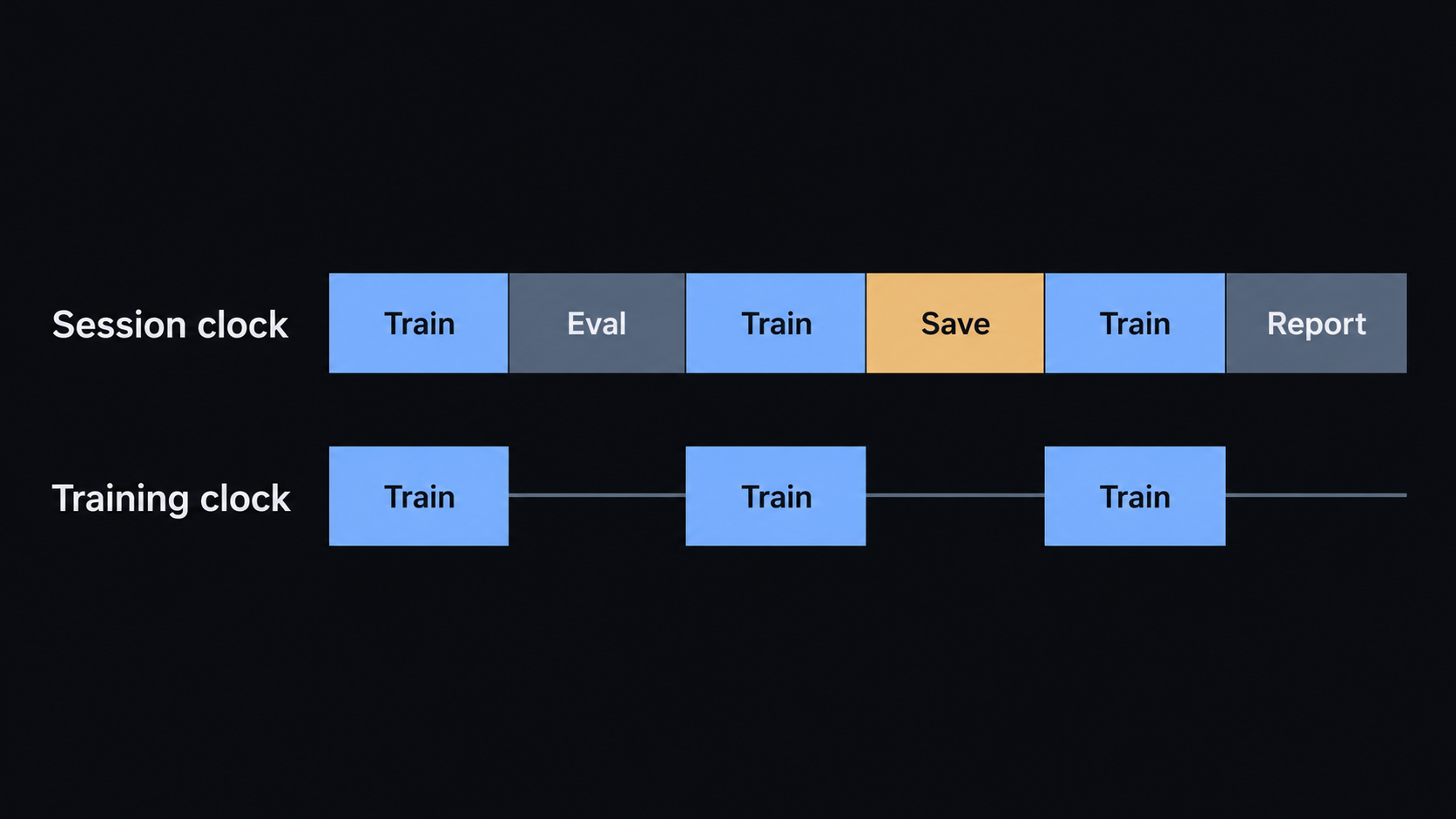
In this implementation, TrainingMonitor records training time separately from evaluation, checkpoint, reporting, and profiling time. It synchronizes CUDA at phase boundaries so queued GPU work is not mistaken for a completed operation. The interval’s train_tokens_per_second describes the training portion. The session’s tokens_per_second uses the elapsed time within the training invocation, including those auxiliary phases but not the earlier data preparation or model setup.
This matters when deciding whether a GPU is affordable for a long experiment. A strong training-only rate does not include the interruptions we deliberately pay for to keep the run observable and recoverable. And a wall-clock rate from a short trial can be distorted by warmup, frequent validation, or one unusually expensive save.
The run summarizer helps separate those stories. It aggregates logged windows, can omit early windows from the steady training-rate calculation, and exposes both that rate and the observed session-wall rate. Its output is meaningful only with the associated configuration and the definition of which windows were included. It also checks basic log consistency, not the physical validity of the measurement.
A useful performance claim therefore sounds less like “this GPU is fast” and more like “under this recorded recipe, after this warmup boundary, the observed training rate was measured separately from the complete session cost.” The actual value belongs in a run record, not in a general description of the hardware.
Use the profiler to find the reason
Throughput tells us how quickly work is moving. It does not tell us why it moves at that speed.
Suppose we notice that updates are slower than expected. Are we spending time in KDA, MLA, the MoE experts, optimizer operations, or data movement? Guessing from the architecture is unreliable. This is where a profiler becomes useful: it is a microscope, not the stopwatch we use for the final performance claim.
The training profiler captures a bounded window of optimizer attempts. Its schedule has wait, warmup, and active phases. It labels training operations such as data loading, forward, backward, optimizer, evaluation, and checkpoint work. Temporary hooks also distinguish the eager architecture’s KDA, MLA, dense FFN, and MoE families.
Rather than retaining a whole training session in memory, it writes a compressed trace.json.gz, a readable summary.txt, and a profile.json that records the window, counters, and capture status. The metadata can say complete, partial, or no_capture. On CUDA, the metadata separately records whether CUDA timings were actually captured. A profile directory existing is not proof that a complete, device-timed trace exists.
There’s another important boundary. Profiling has overhead. The trace is meant to locate bottlenecks, not to be silently mixed into a clean throughput comparison. Measure ordinary training for the rate, then inspect a short profiled run to understand it.
The profiling integration test is designed to compare a profiled path against a baseline, checking checkpoint and random-state agreement under controlled conditions. It also checks the trace and metadata structure. That verifies a valuable software contract. It is not a benchmark result for the future target GPU, and a CUDA test guarded by availability says nothing about a device on which it was not executed.
Memory needs a margin, not just a successful allocation
Imagine packing a suitcase that closes perfectly when it is empty of everything except your clothes. Then you remember the shoes, the charger, and the things you will pick up on the way. A training run has its own version of this problem.
Model parameters are only one part of GPU memory use. Gradients, optimizer state, intermediate activations, temporary kernel allocations, and the caching allocator all contribute. Memory pressure can change with sequence length, batch size, accumulation strategy, chosen kernels, and which phase of the run is active. A short forward-and-backward test might miss the peak that appears during evaluation or elsewhere in the session.
The monitoring code records both allocated CUDA bytes and reserved CUDA bytes, along with their allocator-reported peaks. The peak counters are reset once at the beginning of a monitored session, rather than at every log line:
"cuda_allocated_bytes": torch.cuda.memory_allocated(self.device),
"cuda_reserved_bytes": torch.cuda.memory_reserved(self.device),
"cuda_peak_allocated_bytes": torch.cuda.max_memory_allocated(self.device),
"cuda_peak_reserved_bytes": torch.cuda.max_memory_reserved(self.device),
These fields come from TrainingMonitor.sample_memory. Allocated memory describes live tensor allocations tracked by PyTorch. Reserved memory includes memory its CUDA allocator holds for reuse. The latter is often the more conservative of the two figures to compare with device capacity, but neither is a complete account of other processes or non-PyTorch allocations on the machine.
What counts as enough headroom? There is no universal percentage to copy into every experiment. We must inspect the peak for the intended batch, context length, precision, and model path, then compare it with available capacity while allowing for variability and other GPU users. If we need to reduce context length or change kernels to fit, that is a new recipe to qualify, not an invisible fix to an already approved run.
The same caution applies to CPU memory. The logger records process RSS when it samples, so its sampled peak may miss short-lived spikes. It is a useful signal, not a complete host-memory guarantee.
Can we afford to stop and start again?
A long run will not always finish in one uninterrupted session. The machine may be reclaimed, the process may fail, or we may need to move to another allocation. A checkpoint is useful only if it can be written within an acceptable budget and restored into a valid continuation.
Our checkpoint writer saves at optimizer-update boundaries, after gradients have been cleared. It records the model and optimizer states, training recipe, counters, loader cursors, random-number state, and FP16 scaler state when applicable. It writes a temporary file before replacing the checkpoint path. This reduces the risk of leaving a partially written final checkpoint, but it should not be mistaken for a guarantee against every filesystem or machine failure.
What should we measure? First, save time on the actual storage used for training. The monitor records checkpoint_seconds, separate from training time, so the cost of frequent saves can be considered alongside throughput. The checkpoint file’s size and available disk space also matter. Second, perform an actual save-and-resume trial, verifying that the restored run can continue with a compatible runtime and recipe. A stopwatch around the save alone cannot tell us the recovery time.
The repository’s resume integration test compares interrupted-and-resumed training with an uninterrupted reference. It checks subsequent losses, model weights, optimizer state, loader positions, and random values under deterministic conditions. The loader and runtime checks intentionally reject incompatible resumes. Those tests are stronger than checking whether a file can be opened. They still do not measure checkpoint throughput or establish recovery behavior on an untested machine or filesystem.
The qualification decision
Now we can answer the original question. A GPU is not qualified because it is available, because a tiny model trains, or because its advertised memory exceeds an estimate. It is qualified for a specific run configuration when its critical risks have been tested and their outcomes recorded.
| Question | Evidence needed before accepting the configuration |
|---|---|
| Does it execute correctly? | Representative forward, backward, and optimizer updates with the intended precision and kernels, with numerical failures and skipped updates examined. |
| Is its speed usable? | Training-only and session-wall throughput from identified, comparable windows, plus a bounded trace when a bottleneck needs investigation. |
| Will it fit reliably? | Allocator peaks across the relevant phases, compared with real device capacity and an explicitly chosen safety margin. |
| Can the run be recovered? | Checkpoint-save cost, storage capacity, a successfully loaded checkpoint, and continuation verified on the intended environment. |
These are accept-or-reject questions, not claims that the project has already passed them. The threshold for a usable rate, tolerable save overhead, or sufficient memory margin must be chosen against the actual run budget before interpreting the results. A failed gate may lead us to change the batch, precision, or hardware. That is a sensible engineering decision, provided we test the changed configuration rather than carrying the old verdict forward.
The Training Loop established how to make one update meaningful and recoverable. GPU qualification asks a different question: can that same trustworthy update survive the practical conditions of a real, sustained session? Only after answering it with evidence does the next step make sense: a pilot that tells us whether the full pretraining plan is ready to begin.